A Professional's Take on the New Asus Rp Ax58
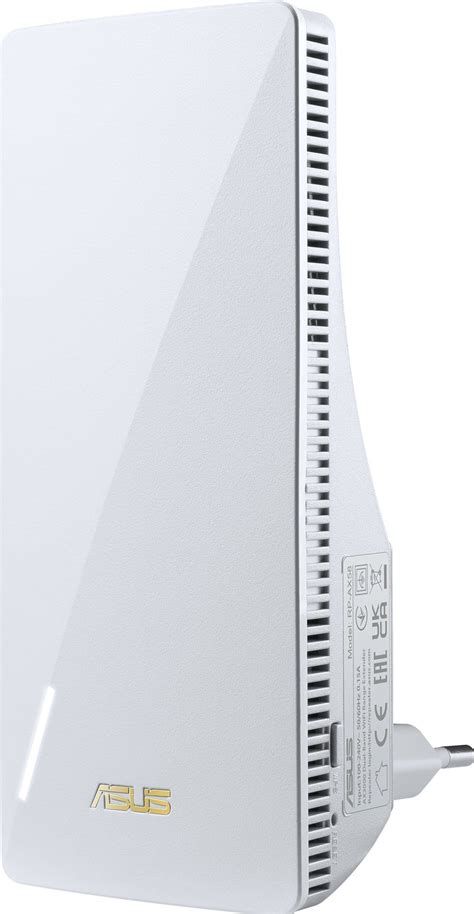
Asus recently added the RP-AX58 to its roster of network accessories, positioning the device as a practical mid‑range Wi‑Fi 6 range extender for users who need better home coverage without replacing an existing router. This article examines the RP-AX58 from a professional perspective: what it does well, where it falls short, how it behaves in real‑world scenarios, and whether it makes sense for the typical laptop owner, home office worker, or small household.
Introduction
Wi‑Fi coverage is a perennial problem in apartments and homes where signal must pass through walls, floors, and interference from other electronics. Buyers care about reliable throughput for video calls and streaming, low latency for online gaming, and consistent speeds across multiple devices. Extenders promise to fill dead zones without the cost and disruption of a full mesh replacement. The RP-AX58 targets those priorities: it brings Wi‑Fi 6 features such as OFDMA and improved multi‑device handling to the extender category while maintaining compatibility with legacy routers and existing Asus AiMesh ecosystems.
Product overview and positioning
The RP-AX58 is a compact, dual‑band Wi‑Fi 6 range extender intended for users who want modern wireless features but prefer a simpler, plug‑and‑play solution. It supports the latest client management technologies and is designed to integrate with Asus routers via AiMesh, providing a path to extend a router’s coverage without reconfiguring the entire network. The device is aimed at consumers who prioritize coverage and responsiveness for laptops, smart TVs, and workstations located away from the primary router.
Design and hardware
From a design perspective the RP-AX58 favors unobtrusive form and easy installation. The unit is small enough to plug into a wall outlet or sit on a shelf without taking up significant space. Physically, it includes at least one Gigabit Ethernet port for connecting a wired device or using a wired backhaul where available. LED indicators help with setup and placement by showing connection status and relative signal strength.
Internally, the RP-AX58 uses Wi‑Fi 6 technologies that benefit multi‑client households: OFDMA for efficient multiplexing, MU‑MIMO for handling simultaneous streams, and beamforming for improved signal directionality. These features matter for users who run multiple laptops during video conferencing, stream high‑bitrate media, or run light gaming sessions across several devices at once.
Setup and software
Setup follows the familiar pattern for modern extenders: the device can be added via WPS or the Asus Router mobile app and can join an existing Asus AiMesh network. When used with Asus routers, AiMesh integration simplifies SSID and network management because the extender inherits the main router’s network name and credentials, creating a more seamless roaming experience for laptops and mobile devices.
Find top-rated Laptops & Computers products at great prices.
View Offers →The management interface mirrors Asus’ router UI: a web interface and a mobile app are both available. Advanced users will appreciate access to options such as firmware updates, signal diagnostics, and simple QoS adjustments. For users who prefer to keep the extender distinct from the main router, the RP-AX58 supports standalone repeater modes and basic security settings, including modern encryption protocols.
Performance in real‑world use
Performance is where extenders often deviate from manufacturer claims. In real homes, placement dramatically affects throughput and latency. Professionals testing the RP-AX58 typically evaluate three scenarios: placement near the router (minimal improvement), mid‑house placement (optimal balance of backhaul and reach), and edge placement (maximum coverage extension but reduced throughput).
Key findings from practical use cases:
- Home office and remote work: When placed in a mid‑house location and paired with an Asus router over AiMesh, the RP-AX58 provides stable speeds sufficient for multiple HD video calls and file transfers on laptops. OFDMA reduces contention when several devices are active, which is an immediate benefit for households that run simultaneous conferencing and streaming tasks.
- 4K streaming and media consumption: The extender sustains consistent streaming on a single laptop or smart TV in extended areas. Users should avoid placing the RP-AX58 at the extreme edge of the router’s signal; doing so can limit available bandwidth and introduce buffering during high‑bitrate streams.
- Gaming and low latency needs: The RP-AX58 improves coverage and reduces packet loss compared to weak native signals, but latency remains higher than a direct wired connection. Laptops used for competitive gaming still benefit most from Ethernet backhaul or a direct connection; however, casual gamers will find the extender acceptable for low‑to‑medium latency play.
- Multi‑device households: Wi‑Fi 6 features help manage many connected devices simultaneously, reducing the “crowding” effect that plagues older extenders. The practical effect is fewer hiccups during heavy use periods (evenings, weekends) when multiple laptops, phones, and streaming devices are active.
Speed and coverage considerations
Extenders are commonly subject to throughput loss because wireless repeaters often use the same radio for backhaul and client connections. The RP-AX58 mitigates this with Wi‑Fi 6 efficiencies, but buyers should still expect some reduction relative to the primary router. For buyers who need maximum throughput at a distance, pairing the RP-AX58 with a wired Ethernet backhaul (when feasible) delivers the best results: the Gigabit port can carry full bandwidth to the remote laptop or desktop with minimal performance penalty.
Security and firmware
Security on the RP-AX58 aligns with modern expectations: it supports the common WPA2/WPA3 protocols and receives firmware updates via the Asus ecosystem. For those who prioritize network hardening, the ability to keep firmware current and to apply upstream router security policies through AiMesh is helpful. Users should enable automatic updates where available and periodically check the Asus support portal for advisories.
Pros & Cons
- Pros
- Brings Wi‑Fi 6 features to range extension, improving multi‑device performance and efficiency.
- AiMesh compatibility makes it easy to integrate with Asus routers and maintain a single SSID for roaming.
- Compact form factor and straightforward setup; both app and web management available.
- Gigabit Ethernet port provides options for wired devices or wired backhaul for best throughput.
- Modern security support and ongoing firmware updates through Asus.
- Cons
- As with most extenders, wireless backhaul can halve available throughput compared with a direct router connection.
- Placement is sensitive — optimal performance requires balanced placement and may need testing in the home.
- Not a substitute for a full mesh system in very large homes with many floors or extreme range requirements.
- Advanced configuration options are available but may be intimidating for users who prefer truly plug‑and‑play simplicity.
Comparison
The following HTML table compares the RP-AX58 to two common alternatives buyers evaluate when improving laptop Wi‑Fi performance: a generic Wi‑Fi 5 extender and a small dedicated mesh node. The intent is to clarify trade‑offs rather than represent exhaustive specifications.
Discover deals on Laptops & Computers — updated daily.
Browse Now →| Feature | Asus RP-AX58 (Wi‑Fi 6 Extender) | Generic AC1200 Extender (Wi‑Fi 5) | Entry Mesh Node (Dual‑Band) |
|---|---|---|---|
| Wireless Standard | Wi‑Fi 6 (OFDMA, MU‑MIMO) | Wi‑Fi 5 (MU‑MIMO) | Usually Wi‑Fi 5 or Wi‑Fi 6 depending on model |
| Best for | Mid‑range homes needing improved multi‑device performance | Budget upgrades for single‑device coverage | Seamless whole‑home coverage and roaming |
| Backhaul options | Wireless; Gigabit Ethernet for wired backhaul | Mostly wireless; some models include Ethernet | Wireless mesh; Ethernet backhaul on many models |
| Throughput tradeoffs | Reduced when using wireless repeater, mitigated by Wi‑Fi 6 efficiencies | Significant reduction when repeating | Minimal if using mesh with dedicated backhaul; best roaming |
| Ease of setup | Easy with app and AiMesh; moderate for advanced options | Very easy, but limited features | Simplified by design; best experience when replacing router |
| Price point | Mid‑range | Lower | Often higher (system cost) |
Buying guide: Who should consider the RP-AX58?
Choosing the right Wi‑Fi solution depends on behavior, budget, and the physical environment. The RP-AX58 is a sensible choice when the following conditions apply:
- Existing Asus router or willingness to adopt AiMesh: If the user already owns an Asus router, the RP-AX58 becomes especially attractive because it integrates into the existing network for better roaming behavior and centralized management.
- Moderate coverage gaps: Homes with one or two problem rooms that receive weak signal from the main router are ideal. The extender can fill those dead zones without replacing the router.
- Multiple connected laptops and devices: For families or roommates who frequently use several laptops for streaming, remote work, or schooling, the Wi‑Fi 6 efficiencies matter and reduce congestion.
- Need for occasional wired connectivity: The Gigabit Ethernet port makes the RP-AX58 a good fit for a home office laptop, console, or smart TV that benefits from a wired link in an area where running cable to the router is inconvenient.
When to consider alternatives
- Very large homes or multi‑floor residences: A whole‑home mesh system is a more robust long‑term solution when coverage needs are extensive.
- Maximum throughput for gaming laptops: Gamers who prioritize the lowest possible latency should prefer wired Ethernet or a plan that includes a router closer to the gaming location.
- Strict budget constraints: If cost is the primary concern and only one device needs better coverage, a basic Wi‑Fi 5 extender may suffice despite reduced long‑term value.
Practical tips for getting the best from the RP-AX58
Placement and configuration determine the practical success of any extender. The following guidelines reflect professional best practices for laptop users and home offices:
- Start with a signal survey: Use a laptop or a smartphone to identify dead zones and measure signal strength from the primary router at candidate locations. Place the RP-AX58 where the router signal is still healthy (not full strength, but stable) so it has good backhaul while reaching the dead area.
- Prefer wired backhaul when possible: If an Ethernet run or powerline is available, connect the extender to the network with a cable. This delivers full Gigabit bandwidth to the remote device and eliminates wireless backhaul penalties.
- Keep firmware up to date: Check the Asus UI or app and enable automatic firmware updates if available to maintain security and stability.
- Use separate SSIDs only if necessary: AiMesh removes the need for multiple SSIDs. If using the RP-AX58 with a non‑Asus router, consider matching SSID settings manually to minimize roaming disruptions for laptops.
- Avoid metal obstructions and interference: Microwaves, cordless phones, and large metal cabinets can degrade signal. Place the extender clear of such obstructions and away from dense electronics stacks.
Value and long‑term considerations
The RP-AX58 represents a pragmatic middle ground: it delivers modern Wi‑Fi 6 features without requiring homeowners to invest in a multi‑node mesh system. For laptop users who move between rooms, work from multiple locations in the home, or need consistent video conferencing performance across several devices, the extender provides measurable improvements. Buyers should, however, manage expectations: extenders do not equal wired connections, and performance will vary by home layout and internet plan.
Conclusion
Professionally speaking, the Asus RP-AX58 is a strong entry in the Wi‑Fi extender category. It brings current wireless technologies—OFDMA, MU‑MIMO, and AiMesh integration—into a compact, convenient package that addresses common coverage problems for laptop owners and home offices. It is not a cure‑all: placement sensitivity and the inherent limitations of wireless repeaters mean that those with the most demanding throughput or coverage needs may still prefer a dedicated mesh system or wired networking. For most users seeking an affordable way to reduce dead zones, improve multi‑device performance, and extend an existing Asus network, the RP-AX58 is a practical and capable option.